Advanced Caddy Plugin Features

Previously, we talked about how to implement a simple Caddy plugin. In this post, we’ll talk about some of the more powerful features we can use. Registering New Types of Network Sometimes, we may want to securely expose a socket on a machine to a remote machine. We can set up an SSH tunnel to do so. The following example from the official documents shows how to set up an HTTP server this way. ...

published on March 10, 2024 · 4 min · 665 words

Writing a Chatbot Powered by Google Gemini Part II

We introduced the basic operations of a Telegram bots and how to create, configure a Telegram bot and how to use it to interact with users. This time, we talk about how to use Gemini to generate responses. Quick Start We can test Gemini api directly using the official website: We can modify some settings on the run: Modifying Model Parameters Model: which model we’re using. Different models are suitable for different tasks. Temperature: Controls the balance between creativity and focus in the generated output. Higher temperature leads to more adventurous output and vice versa. Stop Sequence: Generation will stop when specified output is generated. Useful for controlling output length and creating a clear ending. Safety Settings: Adjusts the restriction regarding harmful and explicit content. Top K: Controls the tokens at each step of the generation. Only top k words are considered. Top P: Only considers tokens whose cumulative probability falls within a certain threshold. Integration with Telegram We can refer to the quickstart to familiarize ourselves with the api. As said before, we’re only interested in handling text and image messages. ...

published on February 26, 2024 · 7 min · 1416 words

Writing a Chatbot Powered by Google Gemini Part I

Google released the Gemini model recently, and it’s free to use. We can use it to create our own chatbot. We’ll start with the introduction to Telegram bots because they are also free and can handle text and image messages. Bots on other platforms should be similar. Info There is a Golang library providing Telegram bots api wrappers. We don’t use it in this post because the api is very easy and self-explanatory. ...

published on February 9, 2024 · 6 min · 1121 words

Writing a Caddy Plugin Part II

Previous post discusses the basics of a Caddy plugin and shows an example of a bare-bone plugin. In this post we implement a Caddy module that listens to a TCP socket and replies Hello world to every connected client. Plugin Considerations Before we begin, we need to think about what our plugin can do and how its behavior can be customized by its user. Depending on the function, the full configuration may be complex, but we should provide a reasonable default to the user. ...

published on January 22, 2024 · last edited on February 3, 2024 · 4 min · 816 words

Writing a Caddy Plugin Part I

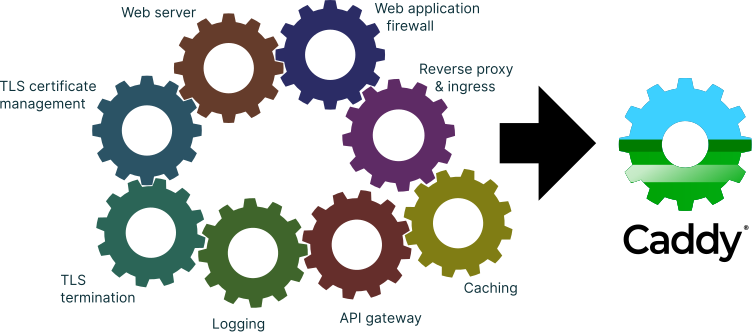
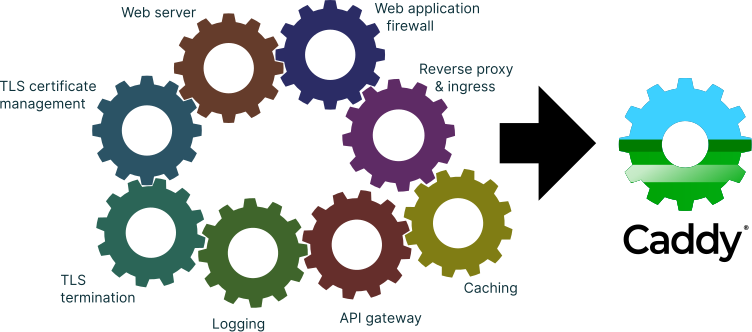
Caddy is a server best known for its auto HTTPS features. It manages TLS certificates automatically without any human intervention. It’s also quite extensible, there are some built-in namespaces that define how we can implement some interfaces to add new functionalities to Caddy. First, let’s see how Caddy works. Caddy Architecture Caddy has three parts: a commandline interface, a core and module system. Command Interface It is how Caddy interprets commandline arguments to run some common tasks such as printing help information and running a simple reverse proxy or a file server. ...

published on January 8, 2024 · last edited on February 1, 2024 · 2 min · 382 words

Setup Wireguard Between Two Servers

WireGuard is a modern VPN that utilizes state-of-art cryptography. It’s very easy to set up compared to other VPNs. In this post we are exploring how to set up secure networks between two servers over the internet. Preparation First, we will need the necessary components: wireguard-go and wg from wireguard-tools. wireguard-go is used to create the network interface that the system uses to create the tunnel between the servers. wg manages the configuration of the interfaces. ...

published on December 28, 2023 · last edited on July 17, 2024 · 4 min · 654 words

Tracking HTTP Upload Progress Using Golang

I wrote a simple cli tool to upload files to my Cloudreve instance. It’s easy to figure out which api to call when uploading files. However, it will be helpful to know how the upload is going. Visualizing Speed When creating an upload request, golang allows us to use a io.Reader as the request body. The body will be responsible for displaying upload progress. Info Although Cloudreve and its storage providers require Content-Length header to be set, thus requiring the total length to be known beforehand, this method is applicable even if the total is unknown. We lose out on the ability to track the percentage of the upload in this case though 🤷. ...

published on December 10, 2023 · 3 min · 574 words

Compiling Static Binaries With Alpine

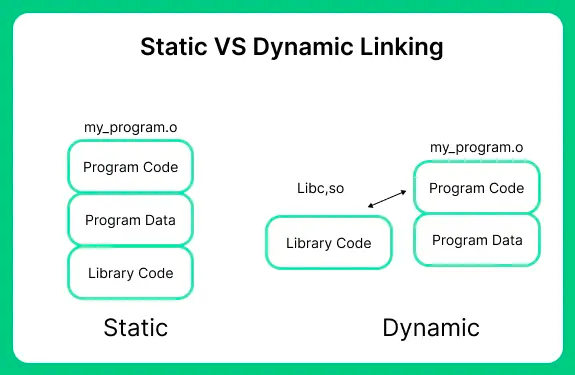
A static build is compiled version of a program which has been statically linked against libraries, according to Wikipedia. In practice, it means we can run a binary anywhere in compatible environments without installing dependencies. Although the binary is considerably larger, it greatly simplifies deployments. Learning by Example - cURL First, we take a look at how a static binary of cURL can be produced: 34 35 36 37 38 39 40 41 42 43 44 45 46 47 48 49 50 51 52 53 54 # dependencies to build curl apk add build-base clang openssl-dev nghttp2-dev nghttp2-static libssh2-dev libssh2-static # these are missing on at least armhf apk add openssl-libs-static zlib-static || true # gcc is apparantly incapable of building a static binary, even gcc -static helloworld.c ends up linked to libc, instead of solving, use clang export CC=clang # apply patches if needed #patch -p1 < ../static.patch #apk add autoconf automake libtool #autoreconf -fi # end apply patches # set up any required curl options here #LDFLAGS="-static" PKG_CONFIG="pkg-config --static" ./configure --disable-shared --enable-static --disable-libcurl-option --without-brotli --disable-manual --disable-unix-sockets --disable-dict --disable-file --disable-gopher --disable-imap --disable-smtp --disable-rtsp --disable-telnet --disable-tftp --disable-pop3 --without-zlib --disable-threaded-resolver --disable-ipv6 --disable-smb --disable-ntlm-wb --disable-tls-srp --disable-crypto-auth --without-ngtcp2 --without-nghttp2 --disable-ftp --disable-mqtt --disable-alt-svc --without-ssl LDFLAGS="-static" PKG_CONFIG="pkg-config --static" ./configure --disable-shared --enable-static --disable-ldap --enable-ipv6 --enable-unix-sockets --with-ssl --with-libssh2 make -j4 V=1 LDFLAGS="-static -all-static" This snippet is from Travis Burtrum’s static curl repository. There are several important points: ...
published on November 20, 2023 · last edited on October 28, 2026 · 6 min · 1210 words

Advanced Postman Features

Postman is an API platform for developers. For average users, it can be used to send HTTP requests very easily. It has an intuitive interface - you can specify different aspects of an HTTP request: the method, the url, the query parameters, the headers and the body if any. Sometimes it’s also easier to call an API using Postman than to use the UI to do something. Postman has some features to make this accessible. ...

published on November 8, 2023 · 2 min · 375 words

Fixing Caddy's HTTP3

Caddy has supported http3 for a long time. First it’s an experimental feature, then in v2.6.0 it is on by default. There were some bugs, but I believe with the latest commits, most of them are gone. Problems Socket Reuse To improve efficiency, caddy tries to reuse sockets between configuration reloads. For Windows systems caddy has to wrap the underlying socket and set deadlines to terminate old use of the socket. For unix systems caddy applies the SO_REUSEPORT parameter when creating the socket. For counting the number of uses of the socket, caddy also wraps these sockets. ...

published on October 25, 2023 · 3 min · 629 words